Inviting a Team Member
Inviting a Team Member
A Team Member that is an Owner or Administrator can invite other Team Members to the Organisation. To invite a new member in the Organisation:
1) Select the Team Members tab under My Organisation.
2) Click the blue 'Invite New Member(s)' button at the right-hand side of the screen

3) Select whether you would like to invite an 'Administrator', a 'CIS Processor' or a 'Billing Manager'.
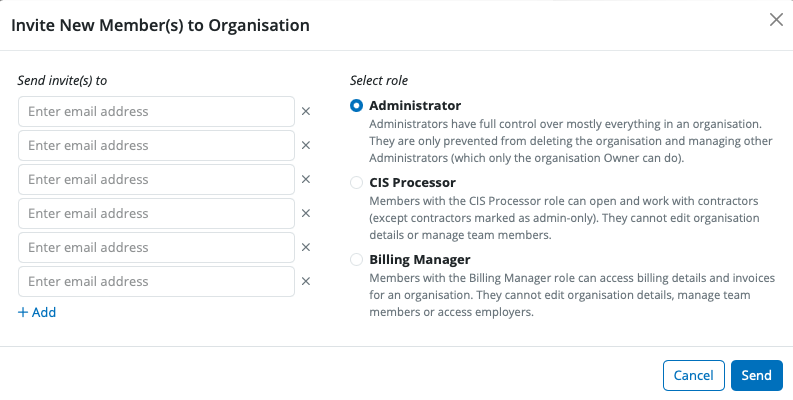
4) Enter in the email address(es) for the user(s) you wish to invite. You can invite multiple users for the same type of user at the same time.
5) Click 'Send'. The status of the invitation has been sent to the new user is now visible.
An email invitation will be sent to the new user, asking them to confirm acceptance of the invitation and to sign up for a Bright Id. The new user will need to sign up for a Bright Id and once signed up will be able to log into BrightCIS. Please click here to sign up for your Bright Id.
Need help? Support is available at 0345 9390019 or [email protected].







