Paying Subcontractors by Cheque
In order to assist the user in paying Subcontractors by Cheque, a dedicated Cheque Payments Report is available in BrightCIS.
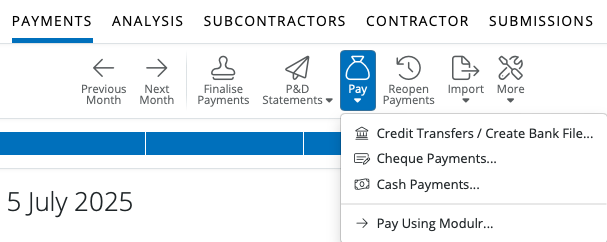
1) After finalising your Subcontractor payments in Payments, simply select 'Pay > Cheque Payments' on the menu toolbar.
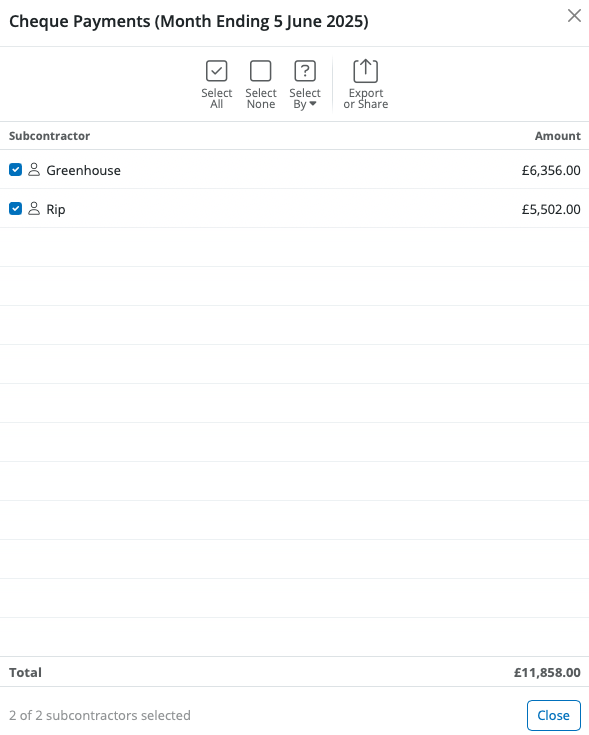
All Subcontractors whose payment method is set to 'Cheque' will be displayed on the screen and the report will show the breakdown of the Cheque payments to these Subcontractors.
2) To subsequently print/email/export the Cheque Payments Report, simply click the Share or Export option on the menu toolbar.
Need help? Support is available at 0345 9390019 or [email protected].
BrightCIS System RequirementsBrightCIS Service InfrastructureIntroduction to BrightCISGetting StartedOrganisation Members ManagementContractor DetailsSubcontractorsBatch Processing CIS ReturnsPaying Subcontractors
Paying Subcontractors by CashPaying Subcontractors by ChequePaying Subcontractors by Credit Transfer & Creating a Bank FilePaying Subcontractors using Modulr
Year End StatementCIS - VAT Domestic Reverse ChargeRTI Requirement from April 2022 - CIS Deductions SufferedProcessing CIS PaymentsImporting/Updating SubcontractorsTwo Factor AuthenticationFAQsEntering your HMRC CredentialsGross CIS Deductions






