Bureau - Client Requests Status on Employer Dashboard.

BrightPay employer dashboard


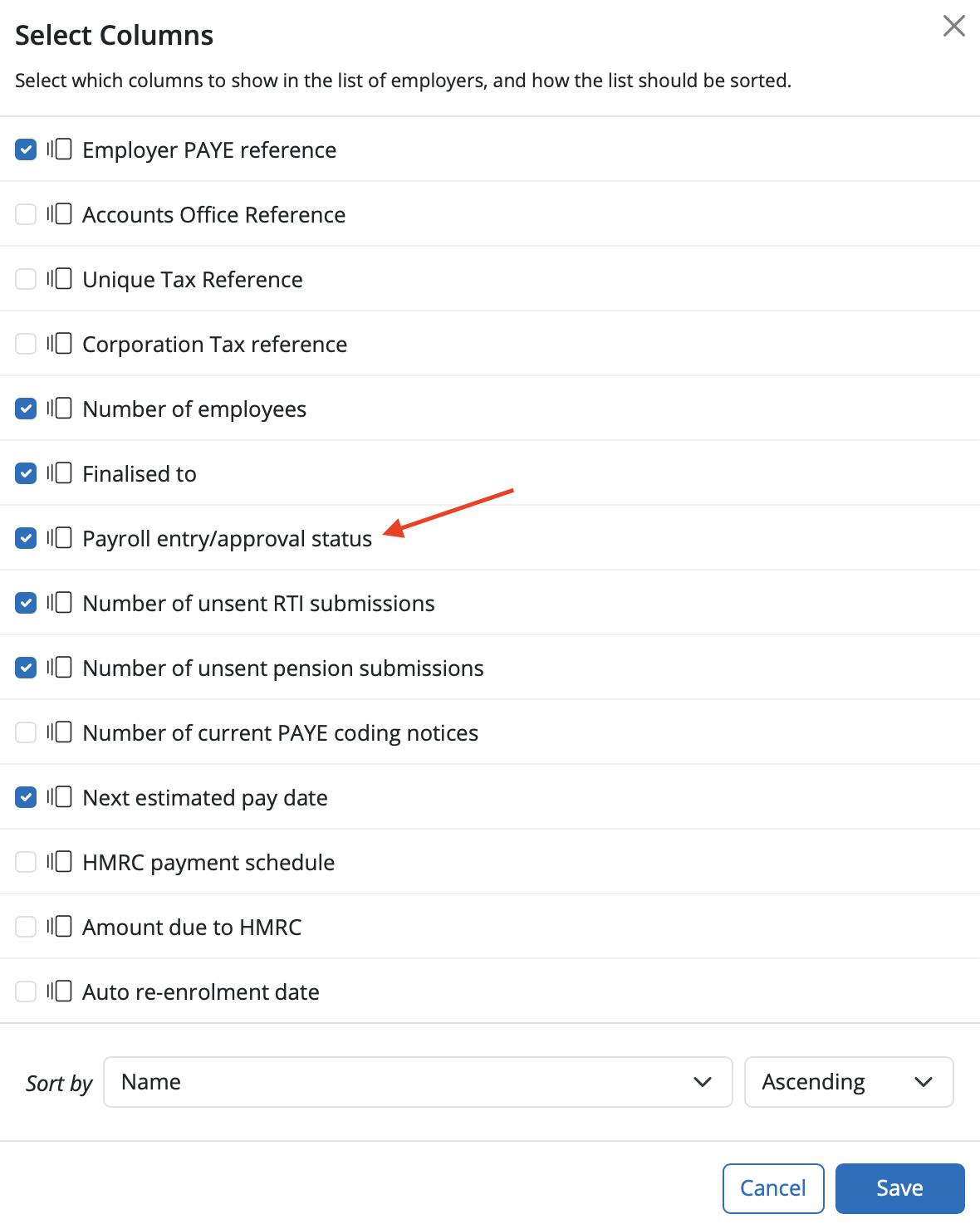
On the employer homescreen you can add a column to show the Payroll Entry/Approval Status for all employers that are listed on the employer homescreen. In order to show this on the employer homescreen select > More > 'Choose Columns'.



Select the option of 'Payroll entry/approval status' as a column to show on the list of employers and 'Save'.


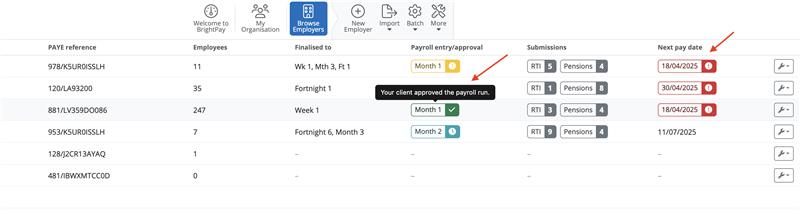
On the employer dashboard if a payroll request has been created in an employer you will see the status of the request and the period the request is for under the column 'Payroll entry/approval'. If you hover your mouse over the you can see more detail. The clock symbol indicates that the request is in progress. The exclamation mark indicates that the request is waiting for the Bureau to review it and the tick symbol is the request is completed.


If the next estimated pay date column is selected for the employer dashboard and the next estimated pay has passed, the date for the employer will be highlighted in red.


Need help? Support is available at 0345 9390019 or [email protected].

BrightPay (Cloud) System RequirementsBrightPay's Employer Tax Rate Card 2025-26BrightPay (Cloud) Service InfrastructureWhat's New in BrightPay?Features not yet available in BrightPayMoving to BrightPay cloudWhat's happening to BrightPay for Windows/Mac?Introduction to BrightPayGetting StartedStarting the New Tax YearImporting Into BrightPay from BrightPay Windows/MacMoving to BrightPay from another payroll softwareOrganisation Members ManagementTwo Factor Authentication - UsersEmployer DetailsEmployee DetailsCoding NoticesPayroll CalendarProcessing PayrollImporting Pay Data using CSV FileDistributing PayslipsPaying EmployeesRTICommon HMRC Error MessagesAnalysisPayroll JournalsHMRCMaking Corrections in PayrollDirectorsOff-Payroll Working (IR35)StartersLeaversStudent Loan DeductionsPostgraduate Loan DeductionsAttachment of EarningsExpenses & BenefitsPensions (outside of Automatic Enrolment)Payroll GivingYear EndRates & Thresholds at a GlanceTaxNational InsuranceNational Minimum Living WageMileage Allowance Payments (MAPs)Employment AllowanceApprenticeship LevyTermination Awards & Sporting TestimonialsGender Pay Gap ReportingStatutory PaymentsEmployee Self Service PortalTwo Factor Authentication - EmployeesManager's PortalBrightPay Client PortalPayslip TranslationsBatch Processing PayrollEmployment VerificationImporting Information From Connect into BrightPay cloudClient Payroll RequestsTimeKeeper IntegrationRelease Notes






