Adding/Amending Employer - RTI Details
To access this utility, click Employer, followed by Edit Employer Details. Sections available for completing/editing under the RTI tab are:
Preferred Government Gateway User ID
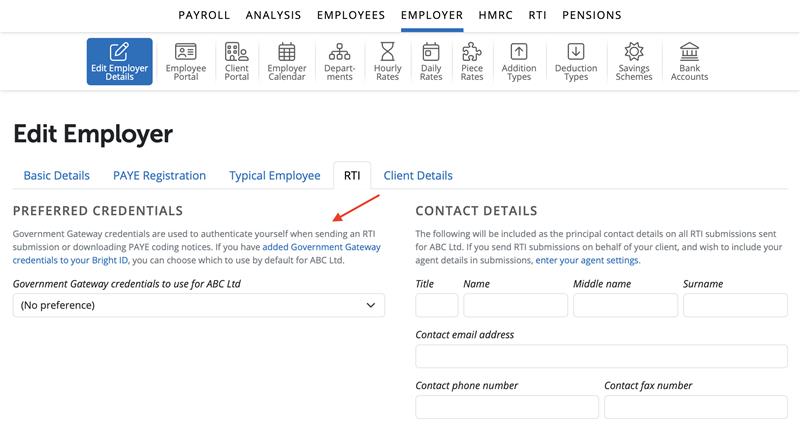
Under > Employer > Edit Employer Details > RTI tab a user can enter or select their preferred Government Gateway credentials to use for an individual employer.
The credentials will be stored on a user level, ie if there are three users on the BrightPay Organisation with access to the same employer and one user only sets up the preferred Government Gateway in their Bright ID and saves this in the employer in BrightPay only that user will see the details saved and not the two other users when they access the employer in BrightPay.
To add Government Gateway credentials to your Bright ID please select the text in blue of 'added Government Gateway credentials to your Bright ID' under the RTI tab in the Employer Edit Details section for the employer and you will be able to add Government Gateway credentials here.
Once added you can select the Government Gateway 'Preferred Credentials' you wish to use for the employer in the dropdown menu. Select 'Save'.
RTI Contact Details
The following will be included as the principal contact details on all RTI submissions sent for the employer. If you send RTI submissions on behalf of your client, and wish to include your agent details in submissions in order to send your RTI Submissions to HMRC.
1) Title and Name
2) Contact Email Address
3) Contact Phone Number and/or Fax number
Need help? Support is available at 0345 9390019 or [email protected].







