P30 & P32


P30 Employer's Payslip


To access your P30 for the tax month or quarter in question, select HMRC on the menu bar and select the tax period you wish to view on the payment schedule bar.


1) Click the P30 button on the menu toolbar
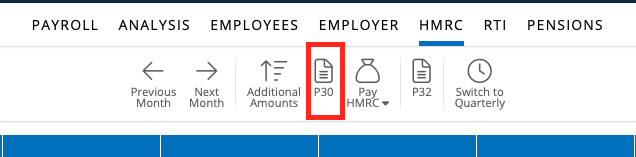


2) To print the P30, click the 'Print' icon on the top right hand corner.

3) To email the P30, click the 'Email' icon on the top right hand corner..  (A default 'reply to' address and an email signature can be added by going to File > Preferences > Email > when complete > 'Save')

4) To download the P32 to PDF, select the 'Download' icon on the top right hand corner.


P32 Employer Payment Record


To access your P32 Employer Payment Record, select HMRC on the menu bar. 


1) Click the P32 button on the menu toolbar.
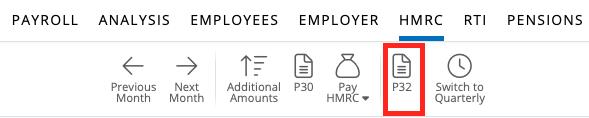


2) To print the P32, click the 'Print' icon on the top right hand corner.

3) To email the P32, click the 'Email' icon on the top right hand corner. (A default 'reply to' email address and an email signature can be added by going to File > Preferences > Email > when complete > 'Save')

4) To download the P32 to PDF, select the 'Download' icon on the top right hand corner.

Need help? Support is available at 0345 9390019 or [email protected].

BrightPay (Cloud) System RequirementsBrightPay's Employer Tax Rate Card 2025-26BrightPay (Cloud) Service InfrastructureWhat's New in BrightPay?Features not yet available in BrightPayMoving to BrightPay cloudWhat's happening to BrightPay for Windows/Mac?Introduction to BrightPayGetting StartedStarting the New Tax YearImporting Into BrightPay from BrightPay Windows/MacMoving to BrightPay from another payroll softwareOrganisation Members ManagementTwo Factor Authentication - UsersEmployer DetailsEmployee DetailsCoding NoticesPayroll CalendarProcessing PayrollImporting Pay Data using CSV FileDistributing PayslipsPaying EmployeesRTICommon HMRC Error MessagesAnalysisPayroll JournalsHMRCMaking Corrections in PayrollDirectorsOff-Payroll Working (IR35)StartersLeaversStudent Loan DeductionsPostgraduate Loan DeductionsAttachment of EarningsExpenses & BenefitsPensions (outside of Automatic Enrolment)Payroll GivingYear EndRates & Thresholds at a GlanceTaxNational InsuranceNational Minimum Living WageMileage Allowance Payments (MAPs)Employment AllowanceApprenticeship LevyTermination Awards & Sporting TestimonialsGender Pay Gap ReportingStatutory PaymentsEmployee Self Service PortalTwo Factor Authentication - EmployeesManager's PortalBrightPay Client PortalPayslip TranslationsBatch Processing PayrollEmployment VerificationImporting Information From Connect into BrightPay cloudClient Payroll RequestsTimeKeeper IntegrationRelease Notes






